
Currently for the Bosch smart system only.
Online service for the Bosch smart system
Bosch eBike diagnostics.
Online in your browser.
Activate lighting, change wattage, resolve an ID conflict or get system data as a PDF, at home via USB, without shipping your bike or receiving a diagnostic device. The free initial check shows which of these three services are possible for your Bosch smart system.
Use pictures to check whether your control unit works with your phone or PC.
Purchases are available only with a billing address in Germany, France, Italy or Spain. Purchases from the United Kingdom, including England, are not available.
Separate procedure · no queue
Only want to reset or clear the service interval?
Go directly to the service interval page. This does not require a remote system analysis. That is why the service interval does not appear in the function selection after the initial check.
Read the stored interval values there for free and choose your new setting. The change costs €4.99 including 19% VAT or can be authorised with a suitable voucher.
Go directly to service interval
Windows PC · Chrome or Edge · USB data cable
Services and prices for your smart system
For lighting functions, ID conflicts and diagnostic reports, start with the free initial check. Set the service interval directly on its dedicated page. You see the price before authorisation. No subscription.
Lights & lighting
Activate the lighting output or adjust wattage
€14.99Resolve ID conflict
Resolve a detected component association problem
€19.99Diagnostic report
Available system data as a PDF
€0Service interval
Set or clear the service interval directly in your browser
€4.99Free services: €0. Paid prices include 19% VAT · Authorisation only after selecting an available function.
How remote diagnostics works →Payment methods
How you can pay.
PayPal · Credit and debit cards
Apple Pay · Google Pay
The payment methods offered depend on your device, browser, country and the payment provider's approval. You will see the available options before paying.
Payments are processed through PayPal. You can redeem a suitable voucher instead. The free initial check and free promotional offers require no payment.
After successful payment, you receive your invoice by email. No invoice is issued for vouchers or free services.
Before connecting
Is your bike compatible?
Before connecting, check your control unit and device in the overview. Only the Bosch smart system is supported.
The check marks apply to BlauWerk diagnostics and programming via USB.
| Control unit | PCWindows Chrome / Edge | PhoneAndroid Chrome |
|---|---|---|
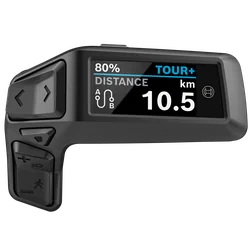 Purion 200BRC3800Display and control unit on the handlebar Purion 200BRC3800Display and control unit on the handlebar |
Yes | Yes |
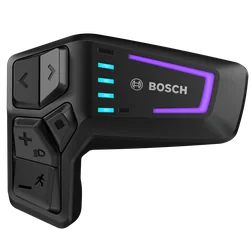 LED RemoteBRC3600Control unit with LED indicators on the handlebar LED RemoteBRC3600Control unit with LED indicators on the handlebar |
Yes | Yes |
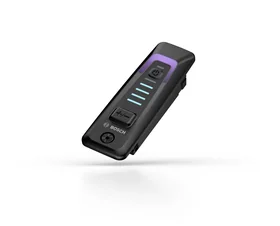 System ControllerBRC3100Control unit in the frame's top tube System ControllerBRC3100Control unit in the frame's top tube |
Yes | Yes |
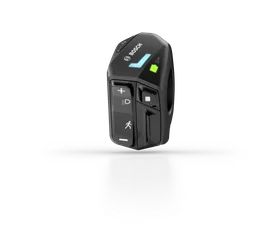 LED ControllerBRC3610Compact control unit on the handlebar LED ControllerBRC3610Compact control unit on the handlebar |
Yes | No |
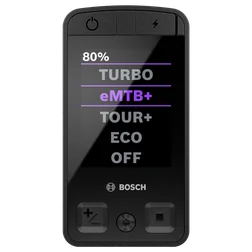 Kiox 400CBRC3200Colour display in the frame's top tube Kiox 400CBRC3200Colour display in the frame's top tube |
Yes | No |
Yes = compatible No = currently incompatible
LED Controller and Kiox 400C: please use a Windows PC. The USB connection on Android phones is currently unreliable. We therefore do not currently offer this combination for diagnostics or programming.
iPhone and iPad are not supported. On Android, the phone must support USB devices and the page must be opened directly in Chrome. Use a USB data cable; a charging-only cable is not enough.
How to connect your bike
- Switch on the eBike and leave it on throughout the session.
- Connect the USB diagnostic port of the pictured control unit to your computer or Android phone. Open its designated port cover to do so. On the System Controller, access depends on the frame; follow your bike's instructions. The Kiox 400C's USB-C port is at the top of the unit.
- Use a cable that can transfer data and a suitable USB adapter if needed. Leave the cable plugged in until completion is confirmed.
- Click “Pair bike in browser”. The selection window shows the eBike under its control unit name, for example “BRC3600” for the LED Remote. Select the correct entry and click “Connect”. Wait for the connection message, then start the system analysis highlighted in blue.
Mini Remote, other displays, motor and battery
The Mini Remote is an additional wireless control. With this setup, the USB connection is made at the System Controller or Kiox 400C. Other displays, the motor and battery are detected through the connected bike where their data is available. The free initial check shows which functions are possible.
Product images: Bosch eBike Systems. Compatibility information: BlauWerk · Last updated 26 September 2026.
Is your eBike compatible?
Have a USB data cable ready. On the next page, we connect your bike and start the free initial check.
Go to the free checkFrequently asked questions about eBike diagnostics
Do I have to send in my eBike or any components?
No. Your eBike stays with you. Connect the supported control unit to your Windows PC or compatible Android smartphone using a USB data cable, then carry out the offered function in your browser.
Do I need a diagnostic device sent to me?
No. No diagnostic device is shipped and no loan device is needed for the BlauWerk online service. You need your compatible Bosch smart system, a USB data cable, internet access and a supported browser. A charging-only cable is not enough.
How does the connection to the BlauWerk workshop work?
For remote diagnostics covering lighting changes, ID conflicts and diagnostic reports, your browser connects your eBike to the BlauWerk workshop via USB and the internet. Diagnostics and authorised changes are carried out using the diagnostic system in our workshop. You choose the offered function and desired setting on the website; no additional diagnostic software is needed on your device. Leave the eBike switched on, the data cable connected and the diagnostic tab open until the website confirms completion.
Which devices and browsers are supported for remote diagnostics?
Only the Bosch smart system is supported. On a Windows PC, use Chrome or Edge. For remote diagnostics covering lighting changes, ID conflicts and diagnostic reports, Chrome on Android works with selected control units; LED Controller BRC3610 and Kiox 400C are currently not supported there. iPhone and iPad are not supported. Before starting, check your control unit in the compatibility overview.
When will I be charged?
The initial check is free. For paid functions, you see the total price before payment; choose an offered payment method or redeem a suitable voucher. The diagnostic report is free for new orders until 17 October 2026, 12:31 and requires neither payment nor a voucher code.
Which payment methods does BlauWerk accept?
We accept PayPal, credit and debit cards, Apple Pay and Google Pay. The payment methods offered depend on your device, browser, country and the payment provider's approval. You will see the available options before paying. Payments are processed through PayPal. Alternatively, you can redeem a voucher valid for the selected function. Free services require no payment.
What happens during the check?
We read your eBike's data and check whether lighting changes, ID conflict resolution and a diagnostic report are available. The website shows the current operation. Leave your bike switched on, the cable connected and the diagnostic page open.
How do I know it is complete?
A change is complete only once it has been transferred and confirmed. You then receive a clear message. Save a diagnostic report as a PDF before the session ends.
Does online diagnostics replace a workshop?
The online check helps with available system data and supported settings. Assembly, mechanical damage and electrical faults must be checked directly on the bike.
Can I set or clear the service interval?
Yes, for the supported Bosch smart system, through the dedicated service interval page. Use Windows with Chrome or Edge; the direct procedure has not yet been confirmed on Android. First, the stored values are read free of charge. Then choose one year from today, another 1,500 km, a custom setting or removal of the reminder. The displayed change costs €4.99 including 19% VAT; alternatively, redeem a suitable voucher. Transfer occurs only after your explicit confirmation.
Why does the service interval not appear after the free initial check?
The remote diagnostics initial check is for lighting changes, ID conflicts and diagnostic reports. The service interval has its own page and therefore does not appear in this function selection. Open the service interval page directly: read the stored interval values there for free, without a prior remote system analysis or workshop queue. The selected change costs €4.99 including 19% VAT or can be authorised with a suitable voucher.
Does the service interval also use remote diagnostics?
The service interval page connects your browser directly to the eBike via USB. No place in the workshop queue is needed. Payment or a voucher authorises only the checked change; it is transferred to the eBike only after your confirmation and then read back. Wait for the success message and then restart the eBike. This neither performs nor proves servicing.
Your contact
BlauWerk.
eBike diagnostics from Ettlingen.
BlauWerk is run by Nikolaus Prasse, Pforzheimer Straße 94, 76275 Ettlingen. For questions about your connection, order or report, reach us through the contact form.
BlauWerk is an independent provider. The name Bosch smart system describes the supported eBike system.
Provider information →