
Currently for the Bosch smart system only.
Help & contact
Help with eBike diagnostics.
BlauWerk support.
Questions about the connection, a function or your invoice?
Purchases are available only with a billing address in Germany, France, Italy or Spain. Purchases from the United Kingdom, including England, are not available.
Write to us.
Describe your enquiry in the form. We will reply to the email address you provide.
To help us help you.
- Which function do you want to use?
- Which message is displayed?
- Which browser and bike are you using?
- For payment questions: your order number.
Please do not send passwords or full payment details.
Control unit compatibility
Compare phone & PC
The check marks apply to BlauWerk diagnostics and programming via USB.
| Control unit | PCWindows Chrome / Edge | PhoneAndroid Chrome |
|---|---|---|
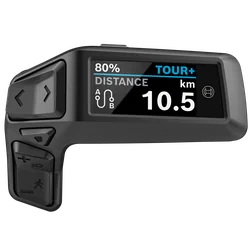 Purion 200BRC3800Display and control unit on the handlebar Purion 200BRC3800Display and control unit on the handlebar |
Yes | Yes |
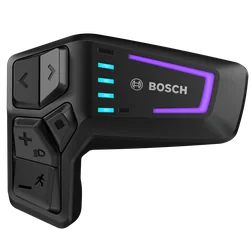 LED RemoteBRC3600Control unit with LED indicators on the handlebar LED RemoteBRC3600Control unit with LED indicators on the handlebar |
Yes | Yes |
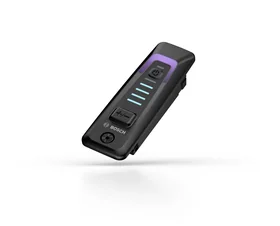 System ControllerBRC3100Control unit in the frame's top tube System ControllerBRC3100Control unit in the frame's top tube |
Yes | Yes |
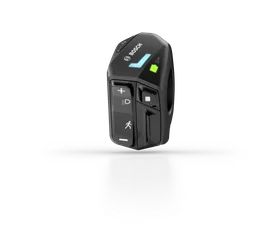 LED ControllerBRC3610Compact control unit on the handlebar LED ControllerBRC3610Compact control unit on the handlebar |
Yes | No |
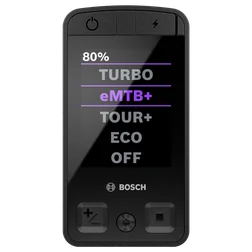 Kiox 400CBRC3200Colour display in the frame's top tube Kiox 400CBRC3200Colour display in the frame's top tube |
Yes | No |
Yes = compatible No = currently incompatible
LED Controller and Kiox 400C: please use a Windows PC. The USB connection on Android phones is currently unreliable. We therefore do not currently offer this combination for diagnostics or programming.
iPhone and iPad are not supported. On Android, the phone must support USB devices and the page must be opened directly in Chrome. Use a USB data cable; a charging-only cable is not enough.
How to connect your bike
- Switch on the eBike and leave it on throughout the session.
- Connect the USB diagnostic port of the pictured control unit to your computer or Android phone. Open its designated port cover to do so. On the System Controller, access depends on the frame; follow your bike's instructions. The Kiox 400C's USB-C port is at the top of the unit.
- Use a cable that can transfer data and a suitable USB adapter if needed. Leave the cable plugged in until completion is confirmed.
- Click “Pair bike in browser”. The selection window shows the eBike under its control unit name, for example “BRC3600” for the LED Remote. Select the correct entry and click “Connect”. Wait for the connection message, then start the system analysis highlighted in blue.
Mini Remote, other displays, motor and battery
The Mini Remote is an additional wireless control. With this setup, the USB connection is made at the System Controller or Kiox 400C. Other displays, the motor and battery are detected through the connected bike where their data is available. The free initial check shows which functions are possible.
Product images: Bosch eBike Systems. Compatibility information: BlauWerk · Last updated 26 September 2026.
Connection help.
The bike does not appear in the selection.
As long as no check or transfer is running: check that the eBike is switched on, your control unit is supported and the cable can transfer data. Close the device selection, reconnect the cable and open the selection again. A charging-only cable is unsuitable.
The check or transfer is running, but progress has stopped.
Keep the eBike, USB cable and diagnostic page connected. An unchanged percentage does not confirm that the operation has been aborted. Follow the status message. Do not disconnect the cable during an ongoing transfer. If there is no clear next step, contact support with the displayed message.
The website confirms an aborted operation.
Follow the next step in the error message. Reconnect the bike only once the operation is confirmed as aborted and the page asks you to reconnect. After an aborted transfer, the bike's data must be read again in full. Cable and internet problems are possible causes; without clear evidence, the cause cannot be reliably identified.
Diagnostics is unavailable.
Wait for the availability message. While the page reports an unreachable service or maintenance, no new diagnostic session can start. Changing the cable will not resolve this condition. Check again later or use the contact form.
Remote diagnostics shows a queue.
Remote diagnostics for lighting changes, ID conflicts and diagnostic reports processes one bike at a time. Keep the page open and watch your displayed queue position. An unused session ends after ten minutes without action. You have 60 minutes to pay from opening the payment page; after purchase or voucher redemption, the session remains reserved for another 15 minutes to start the function. Ongoing transfers must be fully completed.
I have paid, but the function does not start.
Do not pay again. Keep the diagnostic page open and contact BlauWerk with the order number and displayed message. Also tell us whether you are using a PC or Android phone and which control unit is connected.
Paid for the service interval or redeemed a voucher, but no transfer yet?
Do not pay again or redeem a second voucher. Return to the open service interval page and, if necessary, select “Check authorisation again”. If the page reports an interrupted USB connection, click “Reconnect eBike” there and select the same eBike. The page reads the current state again and checks your existing order. You then review and confirm the transfer yourself. If the next step is unclear, contact us with the order number and message.
Do I have to restart the eBike after changing the interval?
Yes. Leave the eBike switched on and connected via USB until the service interval page explicitly confirms that the transfer and read-back were successful. Then you can disconnect the cable and switch the eBike off and on again. Setting or clearing the reminder does not replace servicing.