
EN
Before connecting
Bosch Smart System: models and compatibility
This overview applies to the Bosch smart system. Check your control unit and device before connecting. For older systems, see the overview in the BES2 section.
The initial check works with a supported control unit on Windows, on a Mac with Chrome or on a suitable Android device. The service reminder requires a Windows PC with Chrome or Edge. For other functions, check the device requirements on the relevant function page. The table covers Windows and Android.
| Control unit | PCWindows Chrome / Edge | PhoneAndroid Chrome |
|---|---|---|
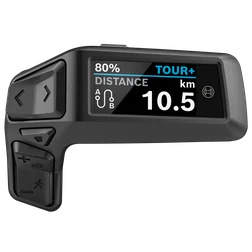 Purion 200BRC3800Display and control unit on the handlebar |
Yes | Yes |
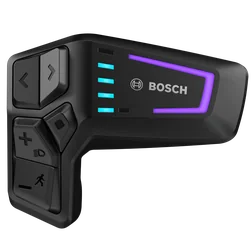 LED RemoteBRC3600Control unit with LED indicators on the handlebar |
Yes | Yes |
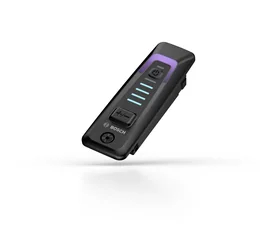 System ControllerBRC3100Control unit in the frame's top tube |
Yes | Yes |
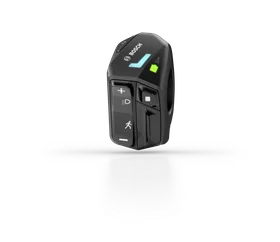 LED ControllerBRC3610Compact control unit on the handlebar |
Yes | No |
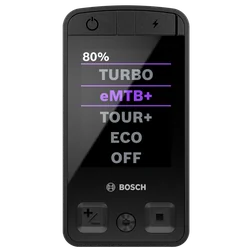 Kiox 400CBRC3200Colour display in the frame's top tube |
Yes | No |
Controller not shown? Compare the displays in the BES2 section. →
Yes = compatible No = currently incompatible
A charging-only cable is insufficient. iPhone and iPad are not supported.
How to connect your bike
- Switch on the eBike and leave it on throughout the session.
- For the initial check, connect the USB diagnostic interface of the control unit shown to your Windows PC, Mac or a supported Android device with USB host/OTG. Open the designated port cover. On the System Controller, access depends on the frame; follow your bicycle’s instructions. The Kiox 400C USB-C port is at the top of the unit.
- Use a cable that can transfer data and a suitable USB adapter if needed. Leave the cable plugged in until completion is confirmed.
- Open the free initial check and click “Start free initial check” yourself. Select your eBike’s control unit in the browser dialog and confirm with “Connect”. The reading then starts automatically. Wait for the complete result.
Mini Remote, other displays, motor and battery
The Mini Remote is an additional wireless control. With this setup, the USB connection is made at the System Controller or Kiox 400C. Other displays, the motor and battery are detected through the connected bike where their data is available. The free initial check shows which functions are possible.
Product images: Bosch eBike Systems. Compatibility information: BlauWerk · Last updated 26 September 2026.
For the free initial check: Chrome/Edge on Windows, Chrome on a Mac or Chrome on a supported Android device, plus a USB data cable. Android requires USB host/OTG. Device support for other functions is listed on the relevant function page.
Check eBike for free